What is MySQL? A Complete Guide to MySQL Database, Applications, Features, and Performance
Data is the most vital asset of any modern software system. Every piece of information entered into a website or application, from user credentials to the inventory of an e-commerce store, requires a secure and structured environment for storage. In the world of technology, this environment is known as a database. Databases allow applications to optimize, store, and retrieve information with maximum efficiency.
Data is the most vital asset of any modern software system. Every piece of information entered into a website or application, from user credentials to the inventory of an e-commerce store, requires a secure and structured environment for storage. In the world of technology, this environment is known as a database. Databases allow applications to optimize, store, and retrieve information with maximum efficiency.
Among the most well-known and powerful tools handling this massive volume of information is MySQL. MySQL serves as the backbone for many large-scale websites, online stores, and content management systems like WordPress. In this comprehensive article, we will explore exactly what this database management system is, how it works, its advantages and disadvantages, and why it has become the top choice in web hosting and software development.
What is MySQL?
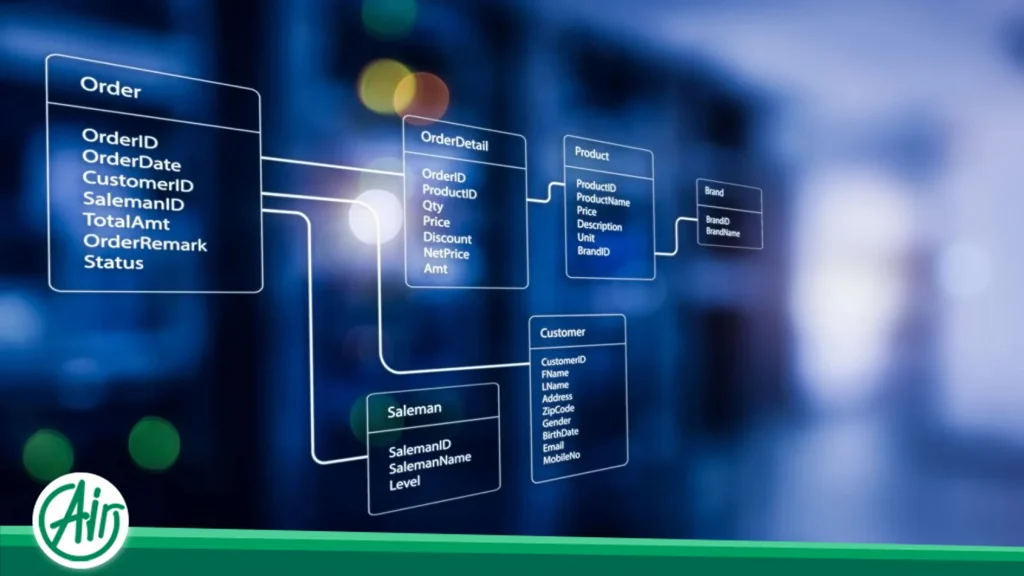
To understand this technology accurately, we must first look at a few foundational concepts. Information in computers requires a structured system for classification, known as a Database Management System (DBMS). MySQL is a Relational Database Management System (RDBMS). The term "relational" means that data is stored in organized tables, and logical relationships are established between these structures to retrieve information with the highest speed and accuracy.
This system is completely open-source, meaning that developers worldwide can view its core code and contribute to its development. The history of this software dates back to 1995, when it was developed by a Swedish company called MySQL AB. Later, the system was acquired by Sun Microsystems, and today it is officially owned and supported by the technology giant Oracle Corporation. High stability, continuous development, and strong corporate backing have made the platform the primary choice for web-based projects.
How MySQL Works
The operation of this database is based on a highly stable, distributed architecture, which can be broken down into specific components.
Client / Server Architecture
The platform operates on a client/server architecture. In this setup, a central core acts as the server that holds all the data, and the software or users who need the information act as clients sending requests to this central node. This separation of duties ensures that resource management on web hosting servers is performed in the most optimized manner possible.
The Role of the Database Server
The database server is the heart of the system. This component is responsible for physically storing data on the server's hard drives, processing incoming requests, controlling access security, and finally sending the appropriate output back to the requester. All heavy processing related to searching and sorting data occurs within this layer.
The Role of the Client
The client in this architecture can be any software that needs to communicate with the DBMS. For example, the client can be the backend programming language of your website (such as PHP), a mobile application, or management tools like phpMyAdmin. The client formulates its request and sends it over the network to the server, then waits for the response.
How Data is Stored
Data in this system is organized using a highly precise grid structure rather than being stored randomly.
-
Table: Tables are the primary storage units that organize data into rows and columns.
-
Row: Each row or record in a table represents an independent entity. For instance, the information of a specific user is stored in a single row.
-
Column: Columns define the attributes of that entity, such as a name column, an email column, or a registration date column.
-
Index: Indexes are structures that act like the index of a book, dramatically increasing the speed of data searching and retrieval.
Query Execution
When a client has a request, it sends it to the server using a structured language. The server receives this statement (Query), analyzes it, finds the optimal execution path, extracts the data from the tables, and returns the result to the client.
The communication flow follows this diagram:
Application -> MySQL Server -> Database -> Tables

Main Components of MySQL
To work effectively with this database, you must become familiar with the structural building blocks that define its overall architecture.
Database
The database is the highest level in this structure, functioning like a master folder that holds all the tables, relationships, and configurations for a specific project.
Table
Tables are the grid structures contained within a database where data is physically stored in rows and columns.
Record
Each row of information inside a table is called a record, representing a complete set of data for a specific entry.
Field
Each individual cell in a table, located at the intersection of a row and a column, is called a field and holds a single piece of data.
Primary Key
A primary key is a unique identifier assigned to each record in a table. This identifier guarantees that no two rows are identical, ensuring highly precise data lookups.
Foreign Key
A foreign key is a field used to establish a logical link between two tables, ensuring referential integrity across the relational system.
Index
A hidden background structure that helps the engine find specific information rapidly without needing to scan every row in a table.
View
A virtual table generated by the results of a query from one or more real tables, used to simplify complex queries and enhance data access security.
Stored Procedure
A collection of precompiled SQL statements stored directly within the DBMS that can be executed repeatedly, reducing code redundancy.
Trigger
Procedural code that automatically executes in response to specific events (such as inserting, updating, or deleting data) on a particular table to enforce data integrity rules.
Applications of MySQL
Due to its high flexibility and stability, the platform is utilized across a vast spectrum of software and digital infrastructures.
-
Websites: The vast majority of dynamic websites use this system to store content and user data.
-
WordPress: WordPress uses MySQL as its default database management system.
-
E-Commerce Stores: Managing thousands of products, financial transactions, and user shopping carts requires the structured precision of this RDBMS.
-
CRM: Customer Relationship Management systems leverage this platform to maintain a complete history of customer interactions.
-
ERP: Enterprise Resource Planning software stores integrated organizational data within the relational tables of the system.
-
Mobile Applications: Apps that require server connectivity store their backend data securely within the database.
-
Accounting Systems: High precision in transactions and support for data integrity make it highly functional for financial tracking.
-
Financial Platforms: Transaction platforms widely deploy it due to its robust support for secure data handling.
-
Social Networks: Platforms handling a high volume of text content and user connections leverage the relational structure of the DBMS.
-
Management Dashboards: Reporting systems and analytical dashboards utilize it to process and display real-time data.
Why is MySQL So Popular?
The immense popularity of the system stems from a powerful combination of advanced capabilities and widespread accessibility.
-
Free of Cost: The Community Edition of this software is entirely free, which significantly lowers infrastructure development costs.
-
High Speed: Its processing engine is optimized to execute queries extremely fast, delivering responses in fractions of a second.
-
Lightweight: Compared to many enterprise competitors, it demands fewer server resources, minimizing memory and CPU overhead.
-
Broad Compatibility: Nearly all web programming languages feature official libraries designed to communicate with it natively.
-
Massive Community: Millions of developers worldwide use it daily, meaning solutions to almost any technical issue can be found instantly online.
-
Robust Security: It includes advanced security layers for user authentication and data encryption.
-
Cross-Platform Support: It can be seamlessly deployed on all major operating systems, including Linux, Windows, and macOS.
-
Hosting Support: Virtually every web hosting provider and control panel supports it out of the box.

Technical Features of MySQL
The following table highlights the core technical capabilities that transform this software into an enterprise-grade database management system.
|
Technical Feature |
Description |
|
Open Source |
The core engine code is fully accessible, allowing deep customization by developers. |
|
Replication |
The ability to copy data synchronously across multiple cloud servers to prevent service downtime. |
|
Backup |
Powerful built-in utilities for generating complete or incremental data backups. |
|
High Availability |
Exceptional stability that ensures continuous data access within clustered environments. |
|
Partitioning |
The ability to split massive tables into smaller, highly manageable pieces to boost processing speeds. |
|
Transaction Support |
Full backing for transactions to ensure group statements execute successfully as a single unit. |
|
ACID Compliance |
Strict adherence to the four core database principles: Atomicity, Consistency, Isolation, and Durability. |
|
Indexing |
Advanced indexing mechanisms that drastically reduce search times within high-volume tables. |
|
Full Text Search |
Built-in capabilities for executing deep, text-based searches within long articles and data fields. |
|
JSON Support |
Native processing and storage capacities for unstructured data formats and JSON documents. |
|
Stored Procedures |
The capability to write programming logic and functions directly inside the database engine. |
|
Triggers |
Automatic system reactions triggered by data modifications to maintain consistency rules. |
|
Views |
Virtual data representations that mask underlying query complexities from the application layer. |
|
User Management |
An advanced privilege system allowing precise control over user access levels and permissions. |
|
Data Encryption |
Strong encryption capabilities for data at rest on storage disks and data in transit over networks. |
|
Secure Connection Protocol |
Full integration with modern security layers to encrypt the entire communication pathway. |
Advantages of MySQL
Utilizing this relational database delivers numerous distinct advantages for developers and system administrators alike.
-
Speed: The storage architecture and query processing engine are engineered to minimize response times, directly accelerating website loading speeds.
-
No Licensing Costs: Eliminating expensive licensing fees makes it an ideal choice for startups and expanding businesses.
-
Security: Multi-layered authentication systems and robust encryption prevent SQL injection attacks and data breaches.
-
Scalability: The system scales smoothly, capable of handling everything from a simple blog to millions of records in an enterprise application.
-
Easy Installation: Deploying the software takes only a few simple commands on an operating system or a single click within a hosting control panel.
-
Abundant Documentation: Due to its longevity, thousands of official guides, tutorials, and documentations are readily available online.
-
Global Community: Active developer forums ensure that troubleshooting advice and technical guidance are accessible around the clock.
-
Resource Efficiency: Low consumption of system memory and processor power allows servers to deliver high performance even on cost-effective hardware.
Disadvantages of MySQL
Despite its many strengths, the platform possesses certain limitations that should be evaluated for highly specialized projects.
Developers utilizing the free version must note the absence of certain enterprise-grade functionalities. Oracle reserves specific advanced monitoring tools, security auditing modules, and specialized backup plugins exclusively for its commercial, paid edition. This distinction between the Community and Enterprise editions means massive organizations requiring these utilities must budget for software licenses.
Additionally, despite massive architectural enhancements, certain limitations persist when dealing with highly complex analytical queries. The system is heavily optimized for fast read-and-write operations (OLTP). However, when handling massive reporting tasks involving heavily nested queries and deep computational analysis, performance degradation can occur. This is where competition with PostgreSQL intensifies, as developers building highly intricate systems often prefer alternative databases that excel at analytical processing.
Key Differences: SQL vs. MySQL
Beginners frequently confuse these two foundational terms. The table below clarifies their distinct definitions.
|
Attribute |
SQL |
MySQL |
|
Definition |
A standardized language used to communicate with databases. |
A software program used to store and manage databases. |
|
Type |
A specialized query language. |
A Relational Database Management System (RDBMS). |
|
Application |
Writing code commands to extract, insert, or modify data. |
Creating the physical environment to hold and process data. |
|
Role |
Represents the language and syntax used to speak to a system. |
Represents the actual program that interprets and executes the language. |
|
Example |
|
Software package installed and executed directly on a server. |
Comparison: MySQL vs. MariaDB
Following Oracle's acquisition of the platform, the original core developers created a fully open-source drop-in replacement named MariaDB.
|
Attribute |
MySQL |
MariaDB |
|
Ownership |
Oracle Corporation |
MariaDB Foundation (Independent & community-driven) |
|
Speed |
Highly optimized, industry-standard speeds |
Slightly faster and more efficient for specific complex queries |
|
Compatibility |
Global industry standard |
Complete drop-in compatibility with identical commands |
|
Security |
Requires Enterprise plugins for specific advanced tools |
Integrates a wider array of security features in the free version |
|
Features |
Focuses on structural stability and core standards |
Offers native support for a broader range of storage engines |
|
Licensing |
Dual-license model (Free Community / Paid Enterprise) |
Completely free and open-source under the GPL license |
|
Community |
Centralized development managed primarily by Oracle |
Decentralized development powered by a global community |
Comparison: MySQL vs. PostgreSQL
These two powerful software suites represent the premier rivals within the open-source relational database ecosystem.
|
Attribute |
MySQL |
PostgreSQL |
|
Performance |
Exceptional for standard, rapid web operations. |
Superb for deeply complex queries and heavy analytical tasks. |
|
ACID Compliance |
Fully supported, with a core optimization focus on speed. |
Highly strict, uncompromising adherence to transaction standards. |
|
JSON Support |
Features standard, reliable JSON capabilities. |
Exceptional JSON processing with advanced indexing support. |
|
GIS Capabilities |
Offers standard, basic geographical data features. |
Features the immensely powerful PostGIS extension for spatial data. |
|
Scalability |
Offers excellent horizontal scaling via replication. |
Excels at vertical scaling and parallel query processing. |
|
Enterprise Use |
Advanced enterprise tools require commercial Oracle licenses. |
Every advanced feature is completely free and open-source. |
|
Replication |
Simple, efficient, and perfectly suited for standard websites. |
Highly advanced, designed for complex server architectures. |
The Role of MySQL in WordPress
WordPress cannot function without a database; without it, the CMS would simply be a collection of static code files. All the dynamic content that shapes a WordPress website is stored and managed within this environment.
The primary function of the DBMS is archiving every piece of data on the site. Every article written is recorded within specific post tables. The structure of pages, encrypted user profiles, and every single comment are safely organized inside these tables. Crucial settings like the site’s URL, title, and plugin configurations are processed directly by the database.
Furthermore, themes and plugins generate metadata to store specific attributes for products or posts. When a visitor opens a page, the PHP code of WordPress connects to the database, fetches this metadata in milliseconds, and delivers a fully rendered visual page back to the user's browser.

How the Database Interacts with Web Hosting
When a web hosting service is purchased, an array of software applications work together to keep the website functional. The host itself is an always-on computer connected to the network. On this computer, a web server (such as LiteSpeed, Nginx, or Apache) intercepts user requests, while a PHP interpreter processes the logical mechanics of the site.
Within this infrastructure, the database serves as the archive that catalogs and delivers data. Popular hosting control panels like cPanel and DirectAdmin manage the system automatically, providing graphical user interfaces like phpMyAdmin so administrators can create and modify databases without needing to write command-line code.
The communication pathway follows this exact routing:
User Browser -> Web Server -> PHP Interpreter -> MySQL Database -> Data Output
Supported Programming Languages
Thanks to its adherence to standardized connection protocols, the platform is compatible with nearly all modern programming languages, offering robust official connectors.
-
PHP: The most common and native pairing for this database, heavily utilized across content management systems.
-
Python: Connects seamlessly through official drivers and powerful Object-Relational Mapping libraries like SQLAlchemy.
-
Java: Deployed extensively within enterprise systems leveraging standard JDBC drivers.
-
Node.js: Utilized within modern backend JavaScript architectures to handle asynchronous data streaming.
-
C#: Integrated easily into application workflows by developers utilizing the Microsoft .NET framework.
-
Go: Google’s compiled language leverages this database frequently to build high-concurrency systems.
-
Ruby: Serves as a primary, reliable database choice within the Ruby on Rails development framework.
-
Perl: Maintains long-standing, highly stable database interactions through dedicated database interface modules.
Available Software Editions
Oracle distributes this software under distinct editions tailored to meet diverse infrastructure demands.
-
Community Edition: The completely free, open-source version utilized by general developers and standard websites worldwide.
-
Enterprise Edition: A commercial, paid subscription featuring advanced monitoring tools, official corporate support, and enterprise security.
-
Cluster Edition: A specialized version designed for systems demanding 100% uptime and multi-server data distribution.
-
HeatWave: Oracle's cloud-integrated analytical service that massively accelerates complex query processing speeds.
Database Storage Engines
A storage engine is the underlying software component that a database management system uses to perform create, read, update, and delete operations on physical storage.
-
InnoDB: The default, standard storage engine featuring full transaction support, foreign key constraints, and automatic crash recovery.
-
MyISAM: An older storage engine featuring fast read speeds but lacking transaction support; rarely used for modern applications.
-
Memory: Stores all data directly inside system RAM rather than on hard drives, providing unmatched speeds, though data is lost if the server restarts.
-
CSV: Saves data directly inside plain text files using comma-separated values, highly useful for exporting data to spreadsheet software.
-
Archive: Engineered explicitly to store massive volumes of historical, rarely accessed data with high-ratio compression capabilities.
Security Practices in MySQL
Protecting information is a critical requirement for any web infrastructure. This platform implements multi-layered security mechanics to protect data from external threats.
-
Authentication: Strong credential validation mechanics that restrict server access strictly to verified users.
-
SSL/TLS Support: Comprehensive integration with modern encryption layers to secure data traffic between the client and the server.
-
Roles and Privileges: Granular access controls allowing administrators to define precise user permissions (e.g., restricting a user to read-only access).
-
Backup Utilities: Advanced automated backup tools designed to prevent data loss in the event of hardware failures.
-
Data Encryption: The capacity to encrypt sensitive column fields, such as user passwords or financial details, directly within tables.
-
Firewall Integration: Capabilities to intercept anomalous query patterns and block malicious SQL injection attempts.
-
Password Policies: Enforces strict password complexity rules and mandatory credential expiration windows.
How to Install MySQL
The installation procedure varies depending on the server operating system, though it remains straightforward across all environments.
On Windows systems, the most efficient method is using the official graphic installer (MySQL Installer). It provides a step-by-step setup wizard to configure network ports, service settings, and administrative accounts without needing command-line execution.
On Linux environments, specifically popular distributions like Ubuntu, installation is handled via official package repositories using standard package management commands. System administrators simply download the server package and enable the service utility. The process is identical on CentOS distributions, where the native package manager initializes the database system in seconds.
For modern development workflows, utilizing Docker is an excellent solution. Docker allows developers to deploy the system within an isolated container using a single line of terminal command, entirely bypassing local operating system dependencies.
Management Tools
Several administrative interfaces have been developed to simplify table design, backup orchestration, and query execution.
-
phpMyAdmin: The most widely deployed web-based graphical interface, available across hosting platforms to manage databases effortlessly.
-
MySQL Workbench: The official desktop application from Oracle, built for professional database design, server administration, and performance tuning.
-
CLI (Command Line Interface): The terminal prompt, providing system administrators with the fastest, most direct method to interact with the engine.
-
Adminer: A highly lightweight, single-file PHP alternative to phpMyAdmin, perfectly suited for quick deployments on resource-constrained environments.
Optimal Use Cases for MySQL
This relational system delivers peak efficiency when deployed within specific application environments.
-
Corporate Websites: Managing informational content, structured contact forms, and service portfolios.
-
E-Commerce Stores: Ensuring precise transaction tracking, inventory updates, and shopping cart stability.
-
WordPress Deployments: Providing the most stable database architecture to host blogs, news portals, and content hubs.
-
CRM Systems: Storing customer profiles, support tickets, and interaction histories in clear relational tables.
-
ERP Software: Centralizing internal business resources, accounting data, and logistics records under strict consistency rules.
-
Online Booking Platforms: Managing reservation schedules while preventing conflicting booking transactions.
-
Mobile App Backends: Synchronizing profile configurations, user states, and app data across devices.
-
API Ingestion Layers: Serving as a reliable structured repository for data exchanged between web services.
When is MySQL Not the Right Choice?
Despite its high capabilities, specific system requirements call for alternative database solutions.
-
Big Data Infrastructures: When handling petabytes of highly unstructured data streams, NoSQL databases deliver superior performance.
-
Deep Statistical Analytics: For heavy analytical reporting across massive historical data pools, dedicated columnar platforms are more effective.
-
Enterprise Data Warehouses: Complex corporate architectures requiring multi-dimensional data processing perform better on specialized warehouse platforms.
-
Excessively Complex Query Environments: If business logic demands deeply recursive, heavily nested relational computing, PostgreSQL is a stronger candidate.
-
Massive Banking Networks: Global financial institutions processing millions of simultaneous international transactions typically utilize proprietary solutions like Oracle Database.
Future Outlook
The trajectory of this platform remains strong under the stewardship and ongoing development of Oracle Corporation. The introduction of cloud-native systems like HeatWave demonstrates a clear commitment to integrating this relational tool into the world of cloud computing and real-time data analysis. Integrating Artificial Intelligence (AI) and Machine Learning models to automate query optimization and predict server load changes represents a core area of ongoing development. These innovations ensure that the database platform maintains peak efficiency in the coming years, solidifying its position as a market leader.
Conclusion: Why MySQL Remains the King of Web Databases
To answer the core question of what MySQL is: it is a robust, open-source relational database management system designed to organize, store, and retrieve data safely. Its rapid processing speeds, lack of licensing costs, massive global community, and verified security frameworks have made it the most trusted infrastructure component for modern web deployment. Whether you are launching a straightforward WordPress blog on a WordPress Host or engineering a complex backend web application, this system provides the most accessible, high-performance infrastructure to power your digital assets.
FAQs
What is MySQL and what is it used for?
MySQL is an open-source relational database management system (RDBMS) that stores data in structured tables. It is widely used to store, manage, and retrieve information for websites, applications, and content management systems.
Is MySQL completely free?
The standard version (Community Edition) is entirely free and open-source, making it ideal for most projects and websites. However, the commercial version (Enterprise Edition) requires a paid license for large scale organizations needing advanced features and official support.
What is the difference between SQL and MySQL?
SQL is a standardized query language used to write commands and communicate with databases, whereas MySQL is the actual software engine that receives those commands and executes them on the stored data.
Why does WordPress use MySQL?
WordPress requires a fast, reliable, and PHP-compatible environment to store its dynamic information—such as post content, user profiles, comments, and configuration settings. MySQL serves as the ideal default system for this architecture.
What is the difference between MySQL and MariaDB?
MariaDB is a fully open-source, community-driven fork of MySQL created by its original developers. While both systems maintain near-complete drop-in compatibility, MariaDB offers slightly faster execution speeds for specific complex queries.
When should I avoid using MySQL?
MySQL is not the best choice for petabyte-scale Big Data structures, heavy analytical data warehousing, or massive global banking systems with highly intricate transactions. In those cases, specialized NoSQL solutions or PostgreSQL are preferred.
What are the benefits of the InnoDB storage engine?
InnoDB is the default engine for MySQL. It supports safe transactions (ACID compliance), handles foreign key constraints, and features automatic crash recovery to protect your data in the event of a sudden server failure.
How can I manage a MySQL database?
You can manage your data using popular web-based graphical interfaces like phpMyAdmin (commonly found in hosting control panels), official desktop software like MySQL Workbench, or directly via the command-line interface (CLI).
Is MySQL secure enough for enterprise use?
Yes, the platform offers robust security mechanisms, including multi-layered user authentication, data encryption at rest and in transit (SSL/TLS), granular access privilege management, and built-in protections against SQL injection attacks.
Which programming languages can connect to MySQL?
MySQL provides official connectors and drivers for almost all popular modern programming languages, including PHP, Python, Java, Node.js, C#, Go, Ruby, and Perl.